


HappenBoard or
The Events Calendar?
HappenBoard vs The Events Calendar: what each free plugin includes, what the paid plans add and what they cost. For WordPress site owners choosing an events plugin, with facts checked on 16 October 2026.
The 30 seconds overview
1
Recurring events are free
HappenBoard Free repeats events daily, weekly, monthly or yearly and counts seats per date. The Events Calendar lists recurring events and series as Events Calendar Pro features.
2
Appointment booking is included
The free plugin also takes appointments: booking types, weekly hours per host, buffers, approval and self-service changes. The Events Calendar’s plugin pages do not list appointment booking.
3
Your events come with you
HappenBoard imports events, venues, organizers, categories, repeat rules, and RSVP and ticket attendees from The Events Calendar. You preview the import first, and the old plugin can stay deactivated.
HappenBoard vs The Events Calendar,
side by side
 | The Events Calendar | |
|---|---|---|
| Free core pluginA plugin you can use without paying |  |  |
| Recurring eventsEvents that repeat on a rule | Free plugin | Pro plan |
| Calendar viewsWays to show events on your site | Free: month, week, day, agenda | Free: month, list, day. Paid plans: seven views |
| Appointment bookingBooking types, hosts and opening hours | Free plugin | Not in its feature lists |
| RSVPsFree registrations with a seat limit | Free plugin | Free, with the Event Tickets plugin |
| Paid ticketsSelling tickets on your site | Pro: Stripe Checkout or WooCommerce | Free Event Tickets: 2% commission on Stripe and Square. Pro plan: no commission |
| QR check-inScanning tickets at the door | Pro: scanner in the WordPress admin | Pro plan: check-in app that also works offline |
| Assigned seatingSeat maps and seat selection | Not available | Elite plan |
| Visitor event submissionsA public form to propose events | Pro | Pro and Elite plans |
| Calendar exportFeeds and files for other calendars | Free: iCal feed, .ics files, Add to Calendar | Free: Google Calendar and iCal export |
| Event structured dataJSON-LD that search engines read | | |
| RequirementsMinimum WordPress and PHP versions | WordPress 6.9, PHP 8.2 | WordPress 6.9, PHP 7.4 |
Need help?
Where HappenBoard and The Events Calendar are really similar
A free core plugin
Both have a free plugin for publishing events, with saved venues and organizers, event categories and tags.

Calendar export
In both, visitors can add an event to Google Calendar or download an iCal file.

Event structured data
Both print JSON-LD structured data on event pages, which search engines read.

Block editor and REST API
Both support the block editor and expose events through the WordPress REST API.

Tickets with Stripe or WooCommerce
Both sell tickets with Stripe or through WooCommerce and check guests in with QR codes. WooCommerce and QR check-in are paid features in both.

Questions for attendees
Both let you ask attendees extra questions when they register, as a paid feature: HappenBoard Pro and The Events Calendar’s Pro plan.
Four differences that actually matter
We picked the four points where the two plugins differ most for a site owner looking for an alternative to The Events Calendar.
Pricing
Recurring events in the free plugin
Weekly classes, monthly meetups and yearly festivals all depend on a repeat rule.
HappenBoard Free includes recurring events. Rules repeat daily, weekly, monthly or yearly, a live preview lists the next dates, and on a series each RSVP and the seat limit apply to one date.
The Events Calendar includes them in its Pro plan. Its WordPress.org page lists recurring events and series among the Events Calendar Pro features, and its website lists the Pro plan at $399 a year (16 October 2026).
Scope
Appointment booking
Coaches, tutors and venues that rent rooms often need bookable time slots as well as events.
HappenBoard Free has appointment booking built in. Booking types set the length, buffers, notice and approval; each host gets weekly hours and days off; customers cancel or move their booking from the link in their email.
The Events Calendar focuses on events and tickets. Neither its WordPress.org page nor its pricing page lists appointment booking (checked on 16 October 2026).
Display
Calendar views
The view decides how visitors browse a busy calendar.
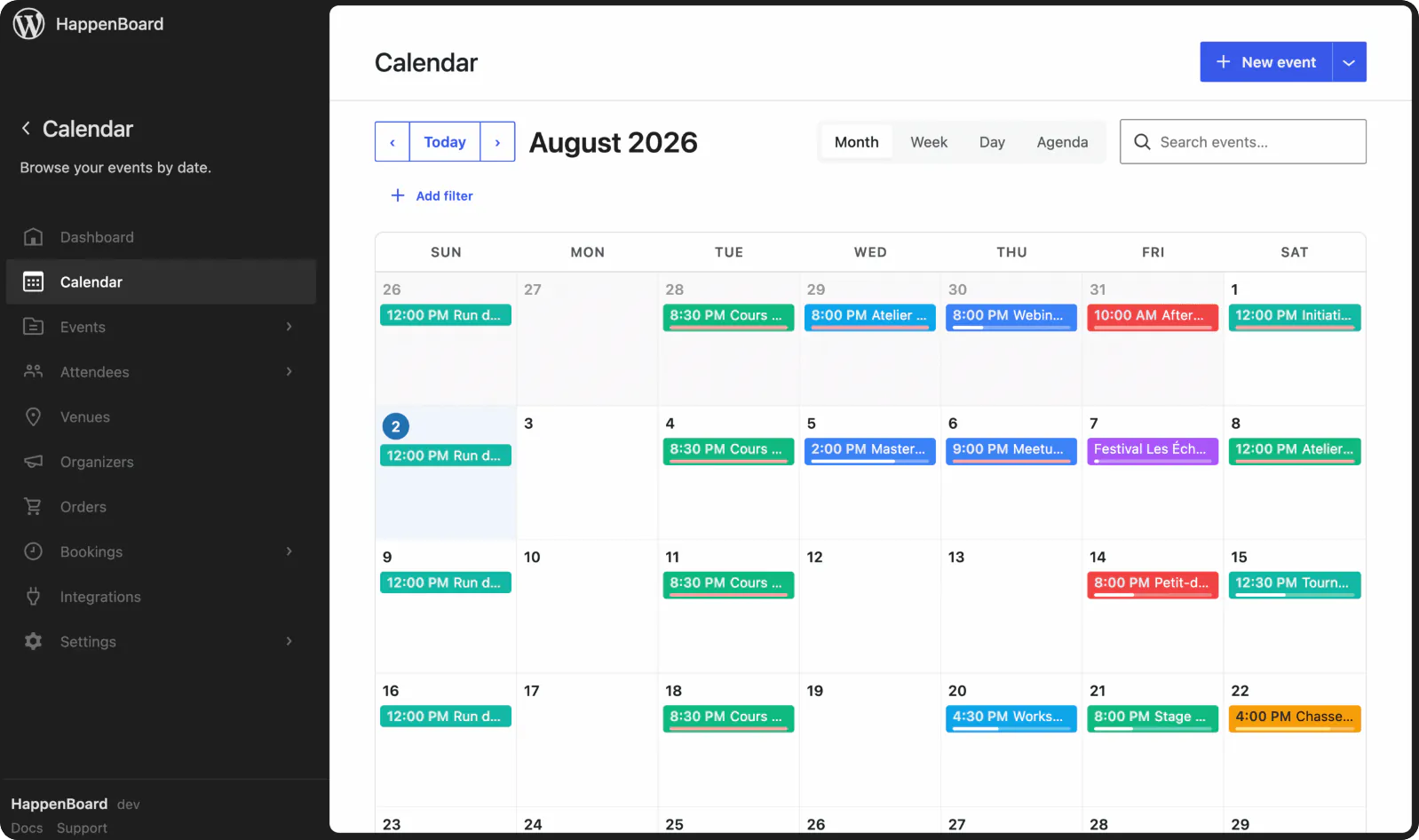
HappenBoard Free shows month, week, day and agenda views. The Calendar block switches views without reloading the page. Pro adds a photo grid, a tile view, a timetable and a clustered map as separate blocks.
The Events Calendar’s free plugin lists month, list and day views. Its paid plans list seven views: month, list, week, day, photo, map and summary.
Tickets
How paid tickets are sold
Fees and payment options change what each sale brings in.
HappenBoard sells tickets with Pro. Buyers pay on a hosted Stripe Checkout page (cards) or through WooCommerce, and each seat gets a QR code on a PDF ticket.
The Events Calendar sells tickets from its free Event Tickets plugin. Its documentation lists a 2% commission on Stripe and Square orders in the free plugin, and its Pro plan lists no ticket commission fees.
What you actually pay
What it costs to get each feature, in US dollars, as listed on each plugin’s website on 16 October 2026.
| Usage | | The Events Calendar |
|---|---|---|
| Events, venues and organizers | $0, free plugin | $0, free plugin |
| Recurring events | $0, free plugin Best price | Pro plan, $399 a year |
| Assigned seating | Not available | Elite plan, $599 a year |
Prices in US dollars as listed on The Events Calendar’s website on 16 October 2026; its plans renew annually. The commission rate comes from its Tickets Commerce documentation. HappenBoard Free costs nothing; HappenBoard Pro prices are on our pricing page.

Good to know
HappenBoard Free covers events, recurring dates, RSVPs and appointments at no cost. Selling tickets needs HappenBoard Pro; with The Events Calendar, you can sell from the free Event Tickets plugin with a 2% commission on Stripe and Square orders, or move to its Pro plan.
When The Events Calendar is the right choice

You need assigned seating
Its Elite plan includes a seating map builder, assigned seats and seat selection. HappenBoard has no seat maps.

Your door has a weak signal
Its website says its check-in app scans QR codes offline. HappenBoard’s scanner needs a connection for each scan.

You want PayPal or Square
Its ticketing takes PayPal, Stripe and Square, and the free Event Tickets plugin sells tickets without a licence. HappenBoard Pro takes cards through Stripe, or the gateways of your WooCommerce store.
HappenBoard in numbers
21
server-rendered blocks
11
ready-made patterns
5
built-in importers
4
calendar views
8
Site Editor templates
How to migrate from The Events Calendar to HappenBoard
1
Install HappenBoard
Install and activate HappenBoard Free. You can deactivate The Events Calendar first: HappenBoard reads its events straight from the database.
2
Preview the import
Open HappenBoard → Settings → Migration (or step 3 of the setup wizard), check the counts found, then click Preview (dry run).
3
Migrate for real
Click Migrate for real. Events, venues, organizers, categories, repeat rules, and RSVP and ticket attendees come across in batches of 50, and a second run skips what is already there.
4
Check, then redirect
Your events show in the calendar at once. Ticket prices are not imported and old event addresses are not redirected, so add redirects in your SEO plugin.
You ask.
We answer.
We’re featured in





Can HappenBoard import my events from The Events Calendar?
Yes. It copies events, venues, organizers, categories and the first repeat rule of each event. RSVP, PayPal and Tickets Commerce attendees come across too, one per person and event with all their seats, as going, declined or cancelled. Tickets, prices and the event website are not imported.
Does The Events Calendar need to stay active during the import?
No. HappenBoard finds The Events Calendar’s data in the database, so you can deactivate the old plugin first. Run Preview (dry run) to see what will come across before you migrate.
Are recurring events really free in HappenBoard?
Yes. HappenBoard Free repeats events daily, weekly, monthly or yearly, with a live preview of the next dates and a seat limit per date. Pro adds changes to a single date: skip it, restore it or reschedule it.
Can I sell tickets with HappenBoard Free?
No. HappenBoard Free takes free RSVPs with a seat limit, a reminder and a cancellation link. Ticket types, payment by Stripe Checkout or WooCommerce, PDF e-tickets and QR check-in come with HappenBoard Pro.
Will my old event addresses keep working?
Not on their own. Imported events get new addresses built from their titles, under /events/ by default, and HappenBoard does not create redirects. Add redirects from the old addresses with your SEO or redirection plugin.
What happens if my HappenBoard Pro licence expires?
Every Pro feature keeps working. The licence key gives you automatic updates, security fixes included, and nothing else.
Works with






Turn your calendar into a box office
Sell tickets, take payments and check people in at the door.
Not the right fit? Your money back within 14 days.
Compare other tools with HappenBoard


Preview first, then import, even with the old plugin deactivated. Repeat rules from The Events Calendar, Events Manager 7 and Sugar Calendar come across, and you can export your events to CSV at any time.
Sources
The facts about The Events Calendar on this page come from its own pages, checked on 16 October 2026: