

Event calendar & views
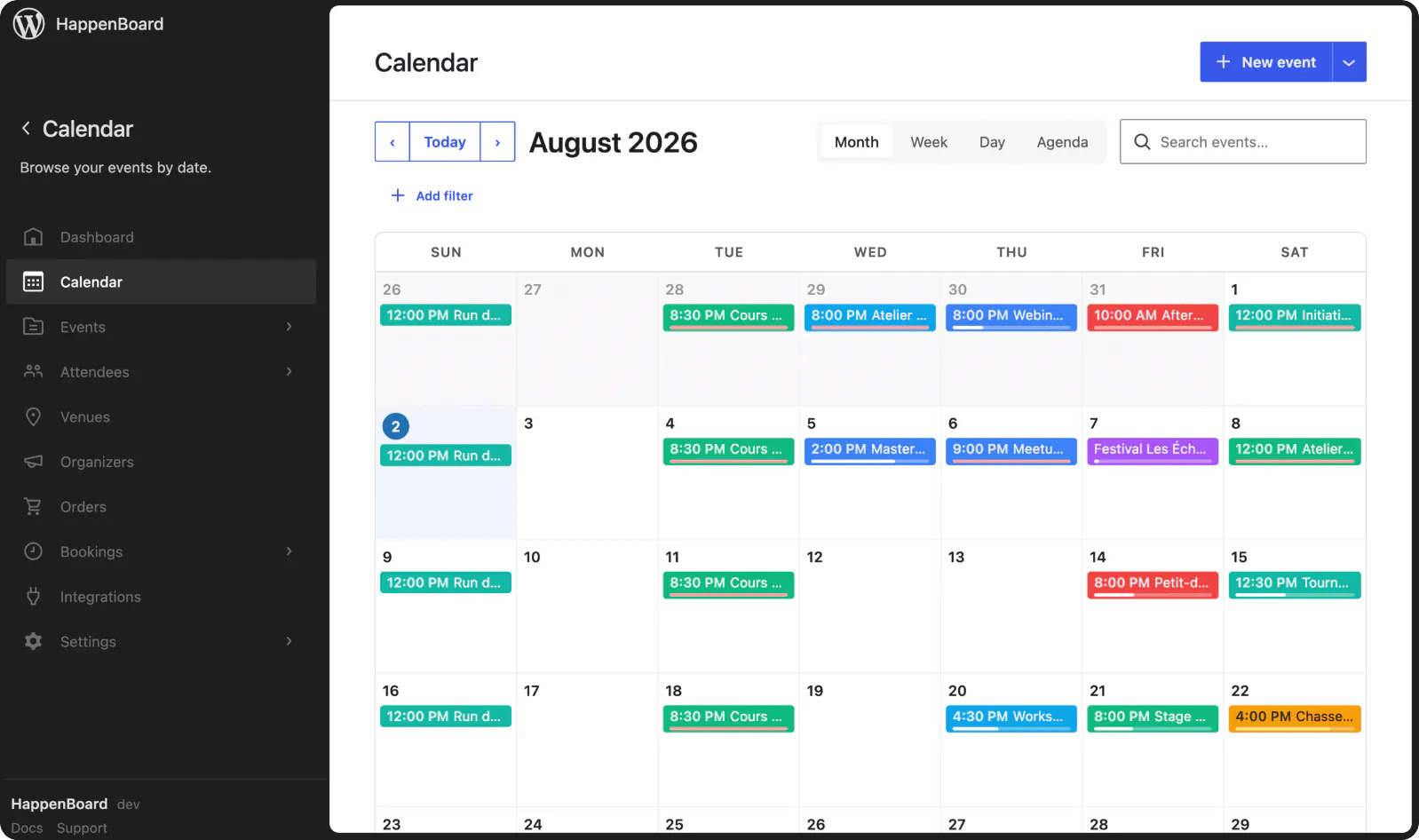
Month, week, day and agenda views, lists and grids, as WordPress blocks that use your theme’s fonts.
Publish, promote and sell your events from WordPress.
Month, week, day and agenda views, lists and grids, as WordPress blocks that use your theme’s fonts.
Create events that repeat daily, weekly, monthly or yearly, with one rule and a link for every date.
Venue pages and maps for your events, plus a clustered map and a search by distance with Pro.
Upcoming events, lists, grids and an Event Query Loop you filter by category, tag, venue, organizer or date range.
Eight Site Editor templates and eleven ready-made patterns, and event pages laid out for you on classic themes.
Eight HappenBoard widgets in Elementor, from the calendar to the event lists and My Schedule.
Mark an event as in person, online or hybrid and add its Zoom, Google Meet, Teams, Jitsi or Whereby link.
A countdown to the start of the event, in days, hours, minutes and seconds.
Visitors save events with a heart, bookmark or star and find them in My Schedule, with or without an account.
The forecast up to 16 days ahead, the weather of past dates and the typical weather beyond, from Open-Meteo.
Each venue and organizer gets its own page with contact details and its upcoming events.
Month, week, day and agenda views in WordPress, drag to move an event, filters, and a warning when a venue is double-booked.
A dashboard, a setup wizard for your settings, emails and imports, and a Cmd/Ctrl+K command palette.
Connect Claude, ChatGPT or Cursor to your site to read and manage events, bookings and venues with your own permissions.
Pro
Describe an event in one sentence and the form fills itself, with your own Anthropic API key.
Pro
Your own fields on events and registration forms: text, number, date, file, choices and more.
Pro
Visitors propose events through a form, and you publish or decline each one.
The calendar, forms and booking pages work with a keyboard and a screen reader: named links, announced changes, kept focus.
Events are standard WordPress content, reachable through REST, CSV and iCal, and kept when you remove the plugin.
Event schema on every published event, server-rendered blocks and cache-friendly forms, plus SEOPress options with Pro.
Attendee emails and an iCal feed for free, plus Google Calendar and Outlook sync, webhooks and Slack with Pro.
Copy your events from five WordPress events plugins or an .ics file, with a dry run before anything is written.
Each event page gives Google its dates, place, seats left and prices, for event rich results.
An iCal feed to subscribe to, a calendar file for each event, and Google and Outlook buttons.
Events, venues and categories translated with WPML or Polylang, shown in the visitor’s language.
Every block renders on the server, 13 of the 21 free blocks load no script, and no jQuery is used.
Change the /events/ base under Settings › Permalinks, and the old addresses redirect to the new ones.
Export your events to a CSV file, or create events from one.
Pro
Search, category, tag, venue, organizer and date filters above your event lists.
Pro
Visitors find events around them by address or with “Use my location”, within 5 to 500 km.
Pro
Published events go to your calendar, and events added there come back as drafts.
Pro
Ten event variables for titles and descriptions, event breadcrumbs, and an option to keep past events out of search results.
Pro
Send emails when someone registers, cancels or checks in, before the event or after it.
Pro
Post registrations and check-ins to Slack, and send confirmations and reminders on WhatsApp through Twilio.
Pro
Send registrations, cancellations and check-ins to your own tools as signed messages.
Sell tickets with Stripe Checkout or WooCommerce, email PDF e-tickets with QR codes and check guests in from your WordPress…
Let clients book a free time on your own site, following your hours, with confirmations and reminders by email.
Take sign-ups on your event pages, set the seats and manage every attendee from one list.
A seat limit per event or per date, a waitlist you manage, and an email when a place opens up.
A confirmation with a calendar file, a reminder, and a notice when a date moves or is cancelled.
Export attendees to CSV, JSON or vCard, with their date, status and answers.
A hidden trap field, a time check and rate limits on every form, with optional Turnstile or Akismet.
Bookings go to the least busy host or to the one the customer picks, and nobody is double-booked.
Customers cancel or move their booking from the link in their email, up to the cutoff you set.
Pro
Buyers pay on Stripe’s secure page in 16 currencies, and the money goes to your own account: HappenBoard takes no commission.
Pro
Each ticket becomes a WooCommerce product, paid through your store’s checkout.
Pro
Search orders, see totals per currency, refund in full or in part, and export to CSV.
Pro
PDF e-tickets with one QR code per seat, your logo, your colour and your font.
Pro
Printable A4 badges, twelve per page, with each attendee’s name and QR code.
Pro
Import attendees from a CSV file and follow each attendee’s payments, check-ins and emails on a timeline.
Pro
Take the full price or a deposit by Stripe, or hold the card until you approve the request.
Pro
Adult, child or member prices, and prices that change by date, season, weekday, time or host.
Pro
Resources shared across booking types: a time slot disappears once its room or equipment is taken.
Pro
Each host connects Google or Outlook, and their busy times are removed from the booking page.
Pro
Visitors search every service at once by date, time of day, location type and price.
Sell tickets, take payments and check people in at the door.
Not the right fit? Your money back within 14 days.
Your cart is currently empty
Every Pro feature from day one, with human support.
Buy HappenBoard Starting from $49 per year